


Room Temperature Thermometer
4.51.54K Reviews
App Specs
- Version
- 38.13.0
- Updated On
- License
- Free
- Downloads
- 5,000,000+
- Developer
- APPVERSE
- Categories
- Weather
- Platform
- Android, iOS
Screenshots
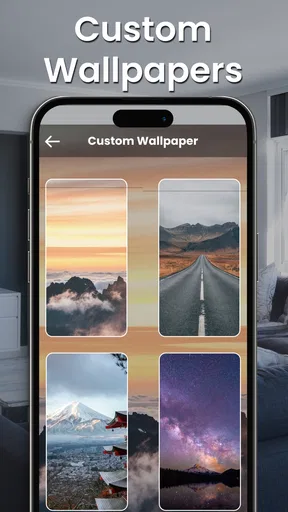
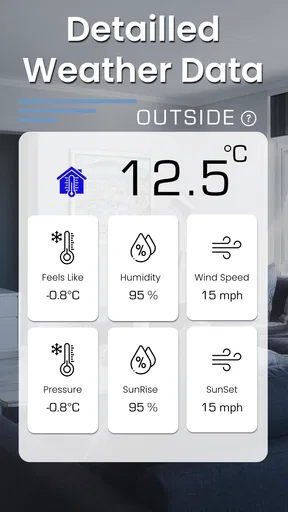
 Analysis by AppCompare
I find a room-temperature reading most useful when it answers a practical question rather than pretending to replace proper equipment. Is the bedroom warmer than the rest of the home? Is the room comfortable enough to sit in for a while? Room Temperature Thermometer is aimed at these quick indoor checks, and its simple purpose makes it easy to understand. I would treat it as a convenient point of reference, not as the final word on a room’s exact conditions.
A quick check in a shared home
In a household where people share rooms, a temperature estimate can help turn vague disagreements into a more useful conversation. If one person thinks the living room is stuffy and another feels fine, checking the same room gives everyone a common starting point. It will not decide what temperature the thermostat should be set to, but it can help you notice whether the room feels different from the hallway or from another part of the home.
A realistic use is checking a bedroom before settling in for the night. I would put the phone down in a shaded, stable spot, wait until it is no longer warm from being held or used, and then treat the result as a rough indication. That small routine is more informative than checking immediately after a long video call or charging session, when the handset itself may be warm. If a reading seems surprising, I would repeat the check in the same location before changing the thermostat.
This approach is especially handy in homes without a thermometer in every room. It can help you decide whether to open a door, move to a cooler space, or compare conditions at different times. It is less helpful if you need a dependable measurement for a sensitive task. In that case, a dedicated room thermometer is the better tool, because a phone-based estimate depends on the device and how it has been used.
Setting expectations before relying on a reading
The key question is whether a phone can measure the air around it. In practice, any estimate based on a handset’s sensors needs careful interpretation: the phone has its own temperature, and that can be affected by recent activity, sunlight, a warm surface, or being kept in a pocket. The app is best approached as a quick household guide, not as a calibrated instrument. I would avoid making a comfort or safety decision based on one number alone.
For a fairer comparison, use the same phone in the same room and place it away from windows, direct sun, heaters, and other obvious sources of warmth. Let it rest rather than holding it throughout the check. If you are comparing rooms, keep the method consistent: similar placement, similar waiting time, and readings taken close enough together that the home’s heating conditions have not changed much. This is a practical way to make the readings more comparable, not a guarantee of laboratory accuracy.
There is also a useful distinction between tracking a pattern and trusting an exact value. A sequence of checks may suggest that one room tends to feel warmer later in the day, while a single reading can be thrown off by where the phone was resting. For plants, a home office, or a room you are trying to keep comfortable, a repeated rough check may be enough to prompt a closer look. If the exact temperature matters, verify it with a separate thermometer.
Worth Reading Before You Choose

Flipboard Shows What News Apps Must Do Beyond the Feed

Switching to Android Auto Means Rethinking Your Driving Routine

Google Calendar Makes a Crowded Week Easier to Manage

Ludo King Makes the Most of the Minutes Between Plans

Baby Panda World Brings Quick Play to Modern Phones, but Its Game Library Feels Busy

ESPN’s Live Game View Makes Following Close Games Easier
How it fits alongside other options
Compared with a basic standalone thermometer, an app has the advantage of being available on a device you already carry. That makes it convenient for a quick curiosity check or for comparing rooms without buying another household item. The trade-off is confidence: a dedicated thermometer is designed to measure ambient temperature, whereas a phone’s readings can be influenced by the handset’s own heat and placement. I would choose the app for convenience and a separate instrument for accuracy.
It also serves a different purpose from a weather app. Outdoor forecasts are useful for deciding what to wear or planning a trip, but they do not tell you how warm a particular room feels. This tool focuses on indoor conditions, so it can complement a forecast rather than replace it. If you only want tomorrow’s weather, a conventional forecast app is the more direct choice; if you want a rough indoor check, this one is closer to the question.
One non-obvious benefit of keeping the method consistent is that it can help identify a location issue rather than a heating issue. A reading taken beside a sunny window may differ from one in the middle of the room, so I would not immediately assume the thermostat is malfunctioning. Repeating the check away from local heat sources can prevent an unnecessary adjustment. The app cannot diagnose a home’s heating system, but a careful comparison can help you decide whether the difference is worth investigating.
Shared-device boundaries and household use
If several people use the same phone, the simplest arrangement is to treat the app as a shared utility and keep the device’s context in mind. A reading made after someone has been gaming, charging, or carrying the phone in a pocket may not be comparable with one taken after it has rested. Rather than arguing over a number, agree on a consistent place and routine for checks. That makes the result easier to discuss without assuming that every person’s device use or experience is identical.
For a shared living space, it may be more useful to check the room itself than to assign the reading to one person. Put the phone somewhere everyone can access, away from direct heat, and use the result as a prompt to discuss comfort. If people are checking at different times, note the circumstances mentally: a sunny afternoon and a cool evening are not a like-for-like comparison. This simple coordination is more valuable than collecting scattered readings without context.
Age, trust, and when to choose another tool
The app is rated for Everyone, which makes its basic purpose approachable across a household. I would still explain to younger users that a phone estimate is not a medical or safety measurement. The content rating does not make the reading more precise, and a child should not be expected to use it to decide whether a room, appliance, or environment is safe. For those situations, rely on an appropriate thermometer and an adult’s judgment.
Room Temperature Thermometer is a poor fit if you need certified accuracy, continuous monitoring, or a measurement that will guide a critical decision. It is also not the right choice if you expect an app to control the home thermostat: its appeal is checking, not replacing dedicated climate equipment. A separate thermometer is the sensible alternative when repeatable precision matters, while a thermostat is the relevant device when you want to adjust heating or cooling.
Getting Started with Room Temperature Thermometer
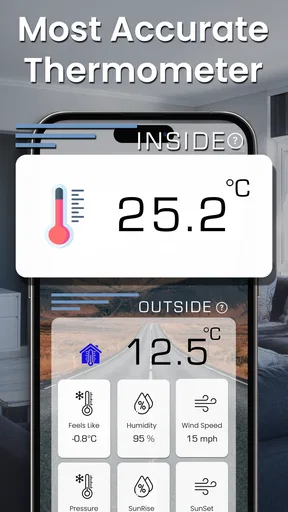
First things first, downloading and setting up the Room Temperature Thermometer is a breeze. Available for both Android and iOS, it’s a quick download from the app store. Once installed, the app opens up to a simple, user-friendly interface that even the least tech-savvy person would find easy to navigate.
The app uses your device’s internal sensors to estimate the ambient temperature. Now, I know what you’re thinking—can a phone really be that accurate? Well, it depends on your device’s sensors and where it’s placed. For the best results, make sure your phone isn’t in direct sunlight or too close to a heat source.
Features at a Glance
What makes this app stand out is its straightforward functionality. It doesn’t bombard you with unnecessary features or ads. Right off the bat, you get a clear reading of the current room temperature. Plus, you can switch between Celsius and Fahrenheit depending on your preference.
Another handy feature is the ability to track temperature trends throughout the day. This can be particularly useful if you’re trying to figure out the best time to adjust your thermostat or if you’re monitoring the conditions for a specific reason, like keeping your plants happy.
My Personal Take
From my experience, the Room Temperature Thermometer app does a pretty decent job of providing a rough estimate of the room temperature. I found it handy for quick checks, especially in rooms where I don’t have a traditional thermometer.
That said, remember it’s not a professional-grade instrument. For critical tasks requiring precise measurements, you might want to stick with a dedicated thermometer. But for everyday use, it’s surprisingly useful.
Final Thoughts
In a nutshell, if you’re looking for a simple, no-frills way to keep an eye on your room’s temperature, this app is definitely worth a shot. It’s easy to use, doesn’t hog your phone’s resources, and provides a good ballpark figure of the ambient temperature.
So, if curiosity about your room’s climate ever strikes, why not give the app a whirl? It might just become one of those small tools you didn’t know you needed.
Who is likely to get the most from it?
I think it makes the most sense for someone who wants an occasional indoor estimate without buying a thermometer for every room. Renters, people moving between rooms while working from home, and anyone curious about an uneven-feeling space may appreciate having a quick reference on hand. The free download also makes it easy to try before deciding whether the convenience is enough for your routine; in-app purchases are offered, so check the purchase details in the store if you want to know what options are available.
APPVERSE is the developer, and the app has a 4.6 average from around 51,000 ratings, with over 1 million installs. Those figures suggest that many people have tried it, but they do not answer the most important question for an individual household: whether a particular phone gives a useful estimate in a particular room. I would judge it by comparing a few careful readings with a standalone thermometer if you already own one.
Practical details before installing
The app was released on December 6, 2022, and its current version is 38.2.0. It is listed for Android 7.0 and newer, and its age rating is Everyone. If you are installing it on a shared family device, check that the operating system is compatible and make sure the person setting it up understands that a rough room reading is not a substitute for a purpose-built measuring tool.
One sensible workflow is to use the app for a few days only when you have a real question, rather than checking constantly. Compare a shaded reading in the morning with another later in the day, then see whether the pattern matches how the room feels. If the result changes dramatically when the phone has just been used or moved, that is a useful reminder to focus on placement and context. It is not a reason to treat every fluctuation as a real change in room temperature.
My household verdict is that this is a convenient extra, not an essential piece of climate equipment. I would recommend it to someone who wants a fast, informal check and is comfortable interpreting the result cautiously. I would skip it if I needed dependable precision, wanted the app to manage heating, or planned to make health or safety decisions from its readings. Used within those limits, it can help a shared household talk about room comfort with a little more context—and that is a modest but worthwhile job.
Pros
- Accurate real-time temperature readings.
- Simple and intuitive user interface.
- No additional hardware required.
- Low battery consumption.
- Quick response and updates.
Cons
- May require internet for initial setup.
- Ads can be intrusive at times.
- Limited features in free version.
- Not a substitute for professional devices.
- Accuracy can vary slightly.
FAQs for Room Temperature Thermometer
How accurate is the Room Temperature Thermometer app?
The Room Temperature Thermometer app provides reasonably accurate temperature readings by utilizing your device's built-in sensors. However, it is important to note that smartphone sensors can be influenced by external factors, such as device heat and environmental conditions. For the most precise measurements, ensure your device is not exposed to direct sunlight or other heat sources.
Does the app require an internet connection to function?
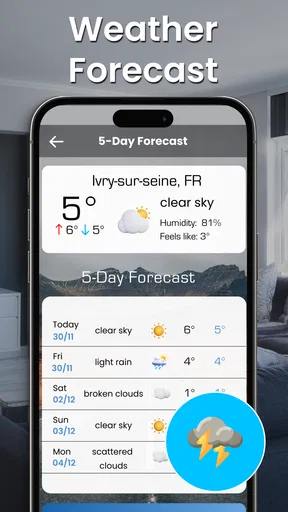
The Room Temperature Thermometer app does not require an internet connection for basic temperature readings as it uses your phone's built-in sensors. However, some advanced features, such as weather updates or cloud syncing, may need internet access to provide additional functionalities and data accuracy.
Are there any hidden costs or in-app purchases?
The Room Temperature Thermometer app is free to download, but it may include in-app purchases or advertisements. These purchases typically offer additional features, such as ad removal or access to premium functionalities. Users should review the app’s pricing details on the download page to understand any potential costs fully.
What permissions does the app require, and why?
The app may request permissions to access your device's location and sensors to provide accurate temperature readings. Location access helps enhance the accuracy of weather-related features. It's crucial to review these permissions carefully to ensure you are comfortable with the data access before installing the app.
How user-friendly is the Room Temperature Thermometer app?
The app is designed with simplicity in mind, featuring an intuitive interface that makes it easy for users of all technical abilities to navigate. Upon launching, users can quickly access temperature readings and other features. The app also provides clear instructions and tips to help users maximize its potential effortlessly.


